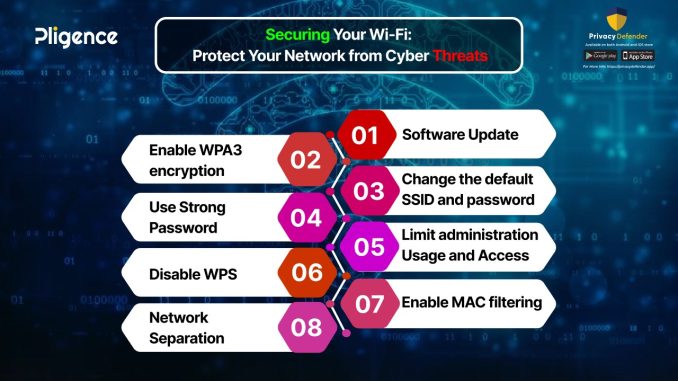
In an increasingly interconnected world, where our lives are intricately woven into the fabric of the internet, the home network has become the central nervous system of our digital existence. From smart thermostats and security cameras to personal computers and mobile devices, a myriad of gadgets constantly exchange data, creating a vibrant, yet vulnerable, ecosystem. While the convenience and connectivity are undeniable, this proliferation of connected devices also opens up a significant attack surface for cyber threats. Many individuals mistakenly believe that cyberattacks are reserved for large corporations or government entities, overlooking the very real and growing risks to their personal data, financial information, and privacy within their own homes. Securing your home network is no longer a niche technical task; it’s an essential aspect of modern digital hygiene, critical for protecting your family and your peace of mind.
The first and most fundamental step in securing your home network begins at its core: the router. This unassuming device is the gateway to your internet connection and, by extension, to all your connected devices. Most routers come with default usernames and passwords that are widely known and easily exploited by cybercriminals. The immediate action upon setting up a new router, or reviewing an existing one, should be to change these default credentials to a strong, unique password. This password should be complex, incorporating a mix of upper and lower case letters, numbers, and symbols, and should be difficult to guess. Furthermore, it’s crucial to disable remote management access on your router unless absolutely necessary, which prevents unauthorized access from outside your home network. Regularly checking for and installing firmware updates from the router manufacturer is also paramount. These updates often contain critical security patches that address newly discovered vulnerabilities, akin to updating the operating system on your computer. Overlooking these basic router security measures is like leaving your front door unlocked in a bustling city.
Beyond the router, the next layer of defense involves securing every individual device connected to your network. Each smart device, computer, and smartphone represents a potential entry point for attackers. The first principle here is the diligent management of passwords. Move away from weak, easily guessed passwords and the dangerous practice of reusing the same password across multiple accounts. Implement strong, unique passwords for every online service and device. Consider using a reputable password manager to securely store and generate these complex credentials, significantly simplifying the process. Furthermore, enable two-factor authentication (2FA) wherever possible. This adds an extra layer of security by requiring a second form of verification, such as a code sent to your phone, in addition to your password. This makes it far more difficult for unauthorized users to gain access, even if they manage to steal your primary password.
The pervasive threat of malware and phishing attempts necessitates robust software defenses. Every computer and device that accesses your network should be equipped with reputable antivirus and anti-malware software. These tools act as digital gatekeepers, identifying and neutralizing malicious software before it can infect your systems and compromise your data. However, antivirus software is only effective if it’s kept up to date. Regular scans and automatic updates are crucial. Complementing this, exercising extreme caution with emails and suspicious links is paramount. Phishing attacks, which attempt to trick you into revealing sensitive information by impersonating legitimate entities, remain one of the most common cyber threats. Always verify the sender of an email, hover over links before clicking to see the true destination, and be wary of urgent or emotionally charged requests for information. A healthy dose of skepticism is your best defense against these social engineering tactics.
Finally, managing your network’s guest access and understanding the privacy implications of smart devices are often overlooked but crucial steps. Most modern routers offer the option to set up a separate guest Wi-Fi network. This is an invaluable security measure, as it allows visitors to access the internet without giving them access to your main network and all your connected devices. This segmentation prevents potential security risks introduced by guest devices. As for smart home devices, many collect vast amounts of data about your habits and environment. It’s essential to research the privacy policies of these devices, understand what data they collect, and configure their privacy settings to your comfort level. Regularly review the permissions granted to apps and devices, disabling any that are unnecessary. In a world where every appliance is becoming “smart,” being mindful of their data collection practices is an integral part of securing your digital footprint. By systematically addressing these layers of security, you transform your home network from a potential vulnerability into a resilient fortress, safeguarding your digital life and providing essential peace of mind.